Contributors:
Amol Ghemud ABCD
Published: November 7, 2024
Summary
GA4 vs GSC numbers differ because GSC counts clicks from Google Search results, while GA4 counts sessions and first-time users recorded by its tag across every channel. Privacy filtering, consent mode, Pacific Time reporting in GSC and attribution widen the gap, so compare GSC web clicks with GA4 google / organic sessions by landing page and judge the trend.
In This Article
Share On:
Marketers often struggle when comparing numbers between GA4 and Google Search Console (GSC). The GA4 vs GSC gap confuses stakeholders who expect a single version of the truth, because both tools seem to report the same visits.
They don’t. GSC counts clicks on Google’s results pages, while GA4 counts users and sessions recorded by its tag across every channel. Here’s what each metric counts, why they differ and how to compare them in 2026, checked against Google’s Help pages.
What Is the Difference Between GA4 Sessions and GSC Clicks?
GSC clicks count how often people clicked from Google Search results to your site, as recorded by Google. GA4 sessions count visits your analytics tag records, and GA4 new users count people logging their first visit. So the 2 numbers rarely match, even for the same pages.
What are clicks in GSC?
Google counts a click when a result sends the user to a page outside Google Search, Discover or News. Clicking the same result again after coming back counts once, and clicks on links inside AI Overviews count too. Grouped by property, a user who clicks 2 of your URLs for 1 query adds 1 click; grouped by page, that’s 2.
What GA4 sessions count
A GA4 session starts when someone views a page with no active session and times out after 30 minutes of inactivity by default. Sessions use non-direct last click, so a visitor who first came from Google organic and returns directly 68 days later is still credited to google / organic.
What GA4 new users count
New users are unique users who logged the first_visit or first_open event. GA4 uses first-party cookies to tell users apart, and browsers cap cookie life for people who don’t return (400 days in Chrome, 7 in Safari). Clear cookies or switch devices and you can be counted as new again, unless User-ID links the visits.
GA4 vs GSC: Side-by-Side Comparison
GSC reports what happened on Google’s results pages; GA4 reports what its tag observed on your site. The difference between GSC and GA4 also shows in filtering and time zones.
GA4 vs GSC: how each tool counts, filters and reports data (Google Help documentation, checked September 2026)
Factor
GA4 (new users, sessions)
GSC (clicks)
What is counted
New users: unique users logging first_visit or first_open. Sessions: visits ending after 30 minutes of inactivity.
Clicks from Google Search results to a page outside Google. A repeat click on the same result counts once.
Data source
The Google tag on your site, so only JavaScript-enabled visitors.
Google’s record of clicks on its results pages.
Traffic scope
All channels. Organic Search includes other search sites, AI Overviews and AI Mode.
Google only, with web, image, video and news as separate search types.
Filtering
Known bots excluded. Data thresholds can withhold rows. Consent mode can model declined users.
Anonymized queries hidden from query tables but kept in chart totals. Tables show 1,000 rows.
Time zone
Your property’s reporting time zone.
Pacific Time (24-hour view uses local time).
Sampling
Possible above 10 million events per query on standard properties.
Privacy filtering and row limits, not sampling, per Google’s docs.
Attribution
Sessions: non-direct last click. New users: First user source.
Canonical URL Google selects.
Freshness
Processing takes 24 to 48 hours.
Usually 2 to 3 days; 16 months of history.
Should GA4 New Users and GSC Clicks Match?
No. GSC counts clicks and GA4 new users counts first-time people, so a 1 to 1 comparison misleads. A returning reader who clicks your result adds a GSC click but no new user, and a first-time visitor from Bing never appears in GSC.
Even with matched filters, GA4 organic traffic and GSC clicks drift apart. Google’s Search Console troubleshooting page names privacy, processing, time lag, time zones and JavaScript as causes.
Privacy filtering in GSC
GSC omits anonymized queries, which the Search Central blog describes as queries not issued by more than a few dozen users over 2 to 3 months. They’re missing from query tables but kept in chart totals.
Consent mode and JavaScript in GA4
GA4 tracks only visitors with JavaScript enabled. Under consent mode, basic setups block tags until users consent, while advanced setups send cookieless pings that behavioral modeling can use once a property qualifies.
GSC days run on Pacific Time; GA4 uses your property’s reporting time zone. On IST, each GSC day starts 12.5 to 13.5 hours after the GA4 day. GA4 processing takes 24 to 48 hours, GSC usually 2 to 3 days.
Channel scope and returning visits
GA4’s Organic Search channel covers every listed search site, so Bing visits sit next to Google. Non-direct last click and the 30-minute timeout add more google / organic sessions, which can push GA4 above GSC clicks.
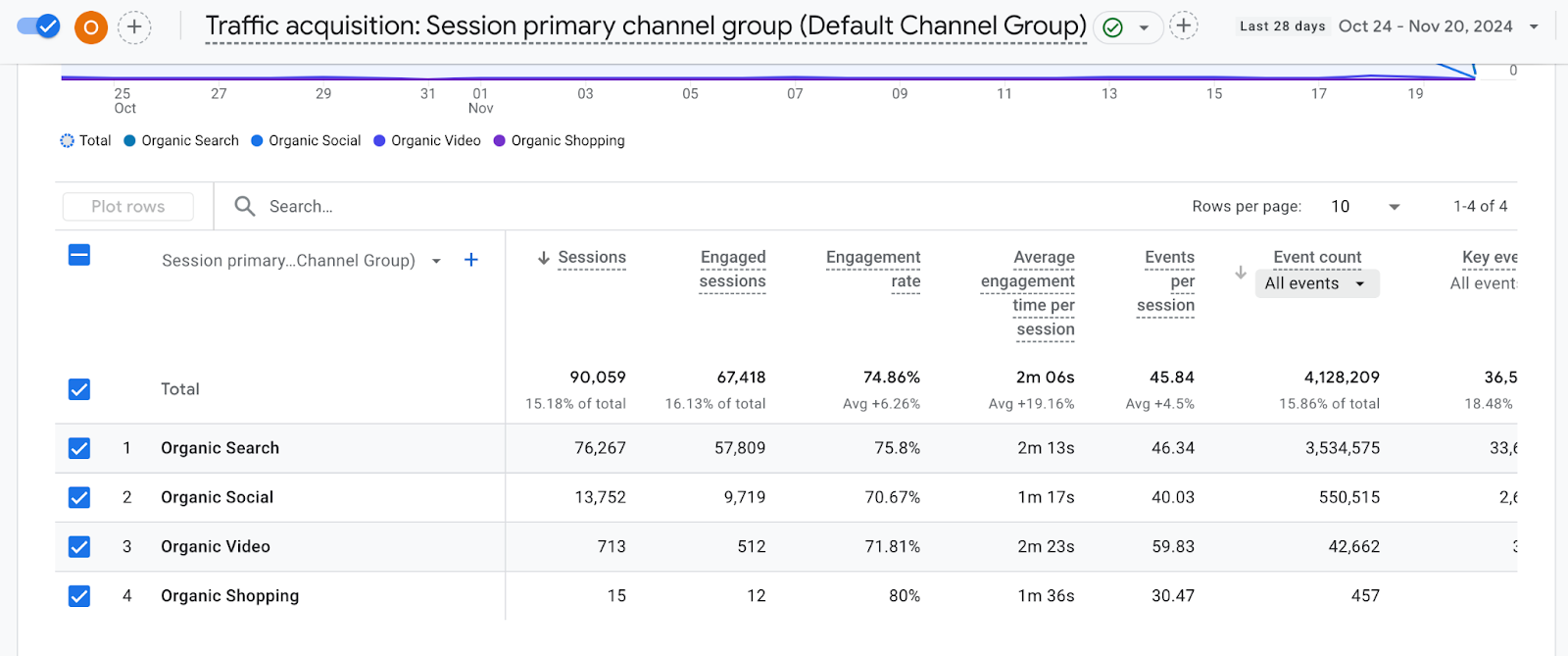
In Traffic acquisition, switch the dimension to Session source / medium and pick google / organic.
Source: GA4
Skip GA4’s click event here. Enhanced measurement fires click for links leading to other websites, so it counts outbound clicks, not search clicks.
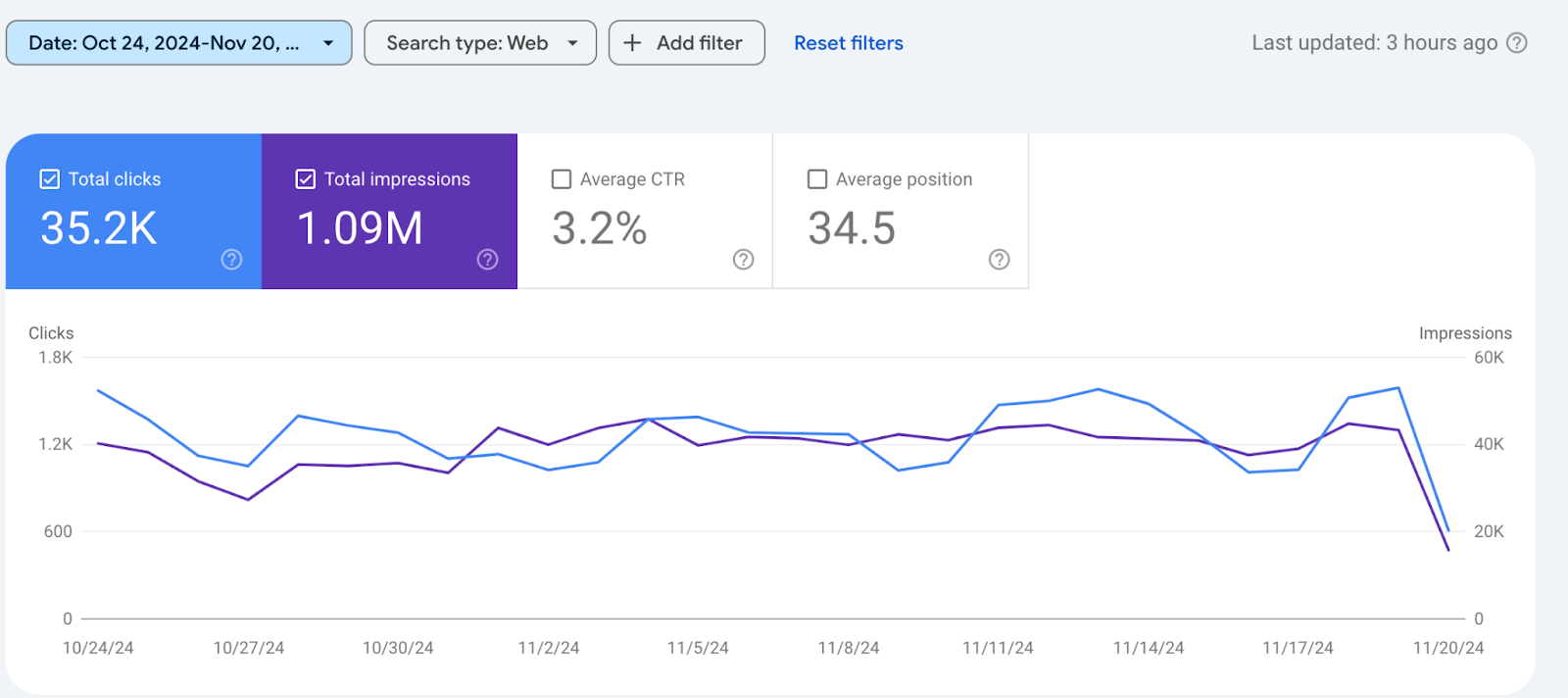
3. Set GSC to web search
In the Performance report, keep Search type on Web.
Source: GSC
4. Match dates and time zones
Use complete days and skip the latest 3 days while both tools finish processing.
5. Compare landing pages and trends
Export both at landing page level and track the ratio week over week. In our experience, a sudden shift points to a tag, consent or canonical change.
GSC or GA4: Which Should Be Your Source of Truth?
Both, for different questions. Use GSC for search visibility and GA4 for what happens after the click. Both now include AI Overviews: GSC counts clicks on AI Overview links, and GA4 files that traffic under Organic Search.
Watch: GA4 New Users vs Google Search Console Clicks Explained
GA4 vs GSC: FAQs
What is the difference between GA4 sessions and GSC clicks?
GSC clicks count clicks from Google Search results to your site, recorded by Google. GA4 sessions count visits the Google tag records from every channel, ending after 30 minutes of inactivity by default. For a fair comparison, match GSC web clicks with GA4 google / organic sessions for the same pages and dates.
What are clicks in GSC?
Search Console counts a click when someone clicks a result that takes them to a page outside Google Search, Discover or News. Clicking the same result again after returning counts once. Clicks on links inside AI Overviews count too, and data is credited to the canonical URL Google selects.
Why don’t Search Console clicks match Google Analytics sessions?
Google cites privacy filtering, processing, time lag, Pacific Time reporting and JavaScript. GA4 adds consent mode, data thresholds and non-direct last click, which credits returning visits to google / organic. GA4 Organic Search also includes other search engines, so sessions can be higher or lower than clicks.
How do I link Google Search Console with GA4?
In GA4 Admin, under Product links, click Search Console Links, then Link. Choose the Search Console property you manage, confirm, select your web data stream and submit. You need the Editor role in GA4 and verified ownership in Search Console, then publish the Search Console collection from Library.
Are Google Search Console image clicks included in web clicks?
No. The Performance report always applies a Search type filter, and web, image, video and news are separate types. To see 2 types together, Google says you must use a comparison, which is limited to 2 items. Check which type your view uses before comparing GA4 vs GSC totals.
Your Next Move: Make Your GA4 and GSC Data Useful
A gap between GA4 and GSC is normal; an unexplained change in that gap isn’t. Run the 5 steps on your top landing pages and note each ratio.
Amol has helped catalyse business growth with his strategic & data-driven methodologies. With a decade of experience in the field of marketing, he has donned multiple hats, from channel optimization, data analytics and creative brand positioning to growth engineering and sales.

 Growth Strategy and Planning
 Inbound Growth
 Growth Hacking
 Fractional CMO
 Search Engine Optimization
 Paid and Performance Marketing
 Social Media Marketing
 Demand Generation
 AI-Driven Growth Strategy
 AI-Native Workflow Automation
 Generative Engine Optimization
 Grove — AI Growth Strategist

 AI Automation
 Framework
 Case Study
 Tools
Tools Growth Tools
 Decision Tree
 Compare
 Custom GPT's
 AI Answer Gap
 Offer
Offer Webstories
 Quizzes
 Blog
Blog AI-powered Apps
 Social Media Tools
 Agency Fit Score