Contributors:
Amol Ghemud Published: October 20, 2023
Summary
Wondering which is the most effective SEO tool> Here’s a comparison between Yoast SEO, a WordPress-focused on-page SEO plugin, and SEMrush, a comprehensive digital marketing tool covering SEO, content marketing, and more. It evaluates their features, benefits, and suitability for different user needs, aiming to guide readers in choosing the most appropriate tool for their SEO and marketing efforts.
Share On:
In This Article
Choosing the right SEO tool can make or break your website’s performance in search engines. With so many options available, two of the most popular tools; Yoast SEO and SEMrush, often come up for comparison. While Yoast SEO is a powerful WordPress plugin focused on on-page SEO, SEMrush offers a broader suite of digital marketing tools, including keyword research, competitive analysis, and content optimization.
In this guide, we’ll break down features, benefits, pricing, SEO writing assistants, and integration options in a question-based format to help you decide which tool best fits your needs.
Yoast SEO: What Are Its Key Features and Benefits?
Using the comprehensive Yoast SEO WordPress plugin, users can improve their on-page SEO and make their content more search engine friendly. It is well-liked due of its intuitive recommendations for creating SEO-friendly content and user-friendly interface. Users may wish to take into account supplemental tools like SEMrush for more general SEO requirements like keyword research and competition analysis even if it primarily focuses on on-page SEO improvement. Here is a list of its attributes:
1. Readability Analysis:
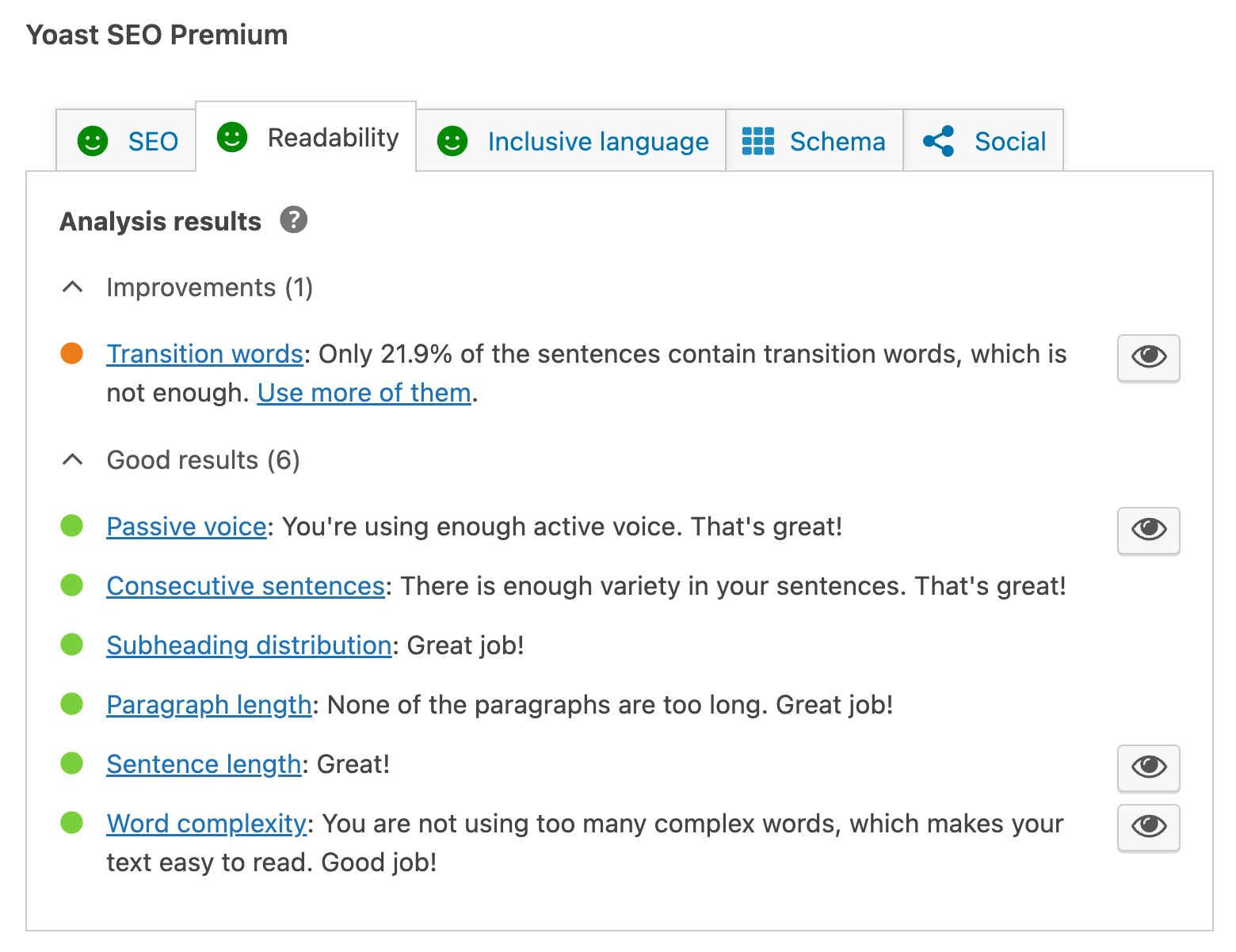
Yoast SEO evaluates your content’s readability and makes recommendations for improvement.
It measures sentence and paragraph length, the distribution of subheadings, and the usage of transition words to improve understanding.
2. SEO Analysis:
Yoast SEO evaluates your content’s SEO friendliness and suggests how to improve it.
It examines outbound and internal links, keyword density, meta tags (title and meta description), and keyword optimization.
3. Internal Linking Suggestions:
As you write, it provides pertinent internal links that help your website’s overall structure.
4. Redirect Manager:
The redirect manager in the plugin makes it easy to set up and manage 301 redirects, maintaining SEO value when URLs change.
5. Schema Markup:
Search engines can better comprehend your content with the help of Yoast SEO’s support for schema markup, which could result in rich snippets being displayed in search results.
6. Premium Features:
A premium edition of Yoast SEO is available with cutting-edge features like multiple target keywords, content insights, and access to round-the-clock assistance.
7. Content and SEO Snippets:
You may choose a focus keyword for your content using Yoast SEO, which also shows you a preview of how it will look in search engine results.
It assists you in coming up with intriguing titles and meta descriptions that are geared to enhance click-through rates.
8. Breadcrumbs:
Breadcrumb navigation is a plugin feature that improves user experience and SEO.
9. XML Sitemaps:
Automatic XML sitemap generation by Yoast SEO makes it quite simpler for search engines to crawl and index your website.
10. Canonical URLs:
It enables you to designate the preferred version of a page and set canonical URLs to prevent problems with duplicate content.
11. Social Integration:
With the help of Yoast SEO’s choices for setting social media metadata, you can make sure that your material will appear fantastic when shared on websites like Facebook and Twitter.
SEMrush: What Are Its Key Features and Benefits?
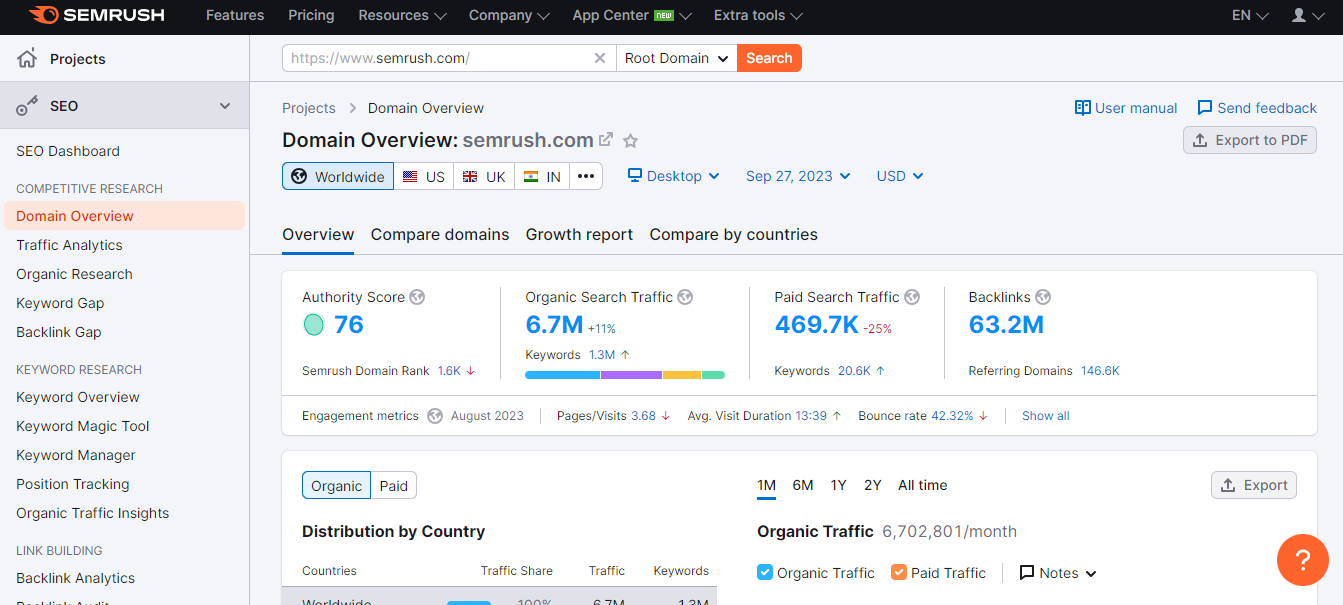
The SEMrush toolbox is designed to help businesses increase their online presence and make informed decisions. There are many features available for SEO, competitive analysis, keyword research, content optimization, advertising, and other things.
Key Features of SEMrush
1. Competitive Research:
SEMrush offers information on the online strategies of your rivals, including the top keywords, backlinks, and marketing initiatives they are using.
2. Position Tracking:
Users can track the search engine rankings of their website for particular keywords and follow its performance over time with SEMrush.
3. Keyword Research:
Users can find profitable keywords, evaluate their search traffic, competition, and trends, and spot chances for long-tail keywords.
4. Site Audit:
SEMrush is a site audit tool that checks for website SEO problems and makes suggestions for enhancing on-page SEO.
5. Backlink Analysis:
Users can examine their and their rivals’ backlink profiles, spot harmful links, and look for link-building chances.
6. Content Marketing:
It provides tools for content analysis and optimization that assist users in producing exciting and SEO-friendly material.
7. Local SEO:
It offers management tools for managing local SEO, such as local keyword tracking, maintenance of business listings, and review tracking.
8. Content Marketing Platform (CMP):
Users may plan, develop, and manage content marketing initiatives with the help of SEMrush’s CMP.
9. PPC (Pay-Per-Click) Advertising:
SEMrush provides resources for setting up and managing PPC ads on websites like Google Ads.
10. Reports and Analytics:
Users can create customized reports to track their digital marketing effectiveness and share findings with coworkers or clients.
11. Training and Support:
In addition to customer support, SEMrush provides instructional materials such as webinars, tutorials, and a knowledge base.
12. Advertising Research:
SEMrush offers information on the ad wording, keywords, and spending of competitors’ paid advertising campaigns.
13. Social Media Management:
Users may check interaction data, schedule and evaluate social media posts, and monitor their online activity.
14. Market Analysis:
For the purpose of informing marketing plans, SEMrush provides statistics on market competitiveness, industry trends, and audience demographics.
Summary: Yoast vs Semrush
The choice between Yoast and SEMrush depends on your specific needs and goals:
Yoast SEO:
Ideal for WordPress users looking for on-page SEO improvement.
Restricted to on-page SEO only inside the WordPress community.
Offers tips for SEO and readability analysis.
Focuses on improving specific content components.
Provides options such as canonical URLs and XML sitemaps.
SEMrush:
Suited for a wider variety of digital marketing requirements.
Suitable for companies and marketers seeking a complete arsenal for marketing.
Provides keyword research, backlink analysis, and competitive analysis.
Offers solutions for content optimization, site audits, and other tasks.
It goes beyond SEO to cover a variety of digital marketing topics.
In the end, Yoast SEO is a niche WordPress plugin, but SEMrush is a flexible digital marketing tool that goes beyond SEO. Your decision should be in keeping with the scope of your internet presence and your specific marketing goals.
Yoast SEO vs SEMrush: How Do Their SEO Writing Assistants Compare?
Here is a comparison between SEO Writing Assistants in SEMrush and Yoast:
Yoast SEO Writing Assistant:
Built especially for WordPress users.
As you are writing or editing material, it provides real-time readability analysis and SEO tips.
Gives advice on how to use keywords, make information easier to read, and organize it.
Enhances the SEO of specific WordPress pages and articles.
Focuses on WordPress’ ecosystem’s on-page SEO optimization.
Restricted to WordPress content and websites.
SEMrush SEO Writing Assistant
A standalone tool appropriate for a wider range of websites and content management systems (CMS).
Provides tips for content optimization and real-time SEO advice.
Suitable for bloggers, marketers, and content producers operating across numerous platforms.
Reveals specific information on the target audience’s engagement, voice, and readability.
Provides a broader range of services, including content optimization for websites other than WordPress, including blogs, articles, landing pages, etc.
Integrates with the extensive collection of digital marketing tools from SEMrush.
In conclusion, both Yoast and SEMrush provide SEO writing assistants, but their compatibility and range of functionality vary. For WordPress users, Yoast’s SEO Writing Assistant offers on-page SEO advice within the WordPress environment. While providing a more comprehensive selection of content optimization features, SEMrush’s SEO Writing Assistant is a standalone tool appropriate for many CMS and website systems. Your decision should reflect your needs for content management and a CMS.
Yoast SEO vs SEMrush: How Can You Integrate Them for Maximum SEO Impact?
Yoast and SEMrush integration can be advantageous for anyone seeking to combine the strengths of the two technologies. Here is how they can work together even when their main functions differ:
Yoast SEO (for WordPress):
Provides features including canonical URLs, XML sitemaps, readability analysis, and SEO advice.
Primarily concentrates on WordPress’s on-page SEO optimization.
Best for WordPress website content optimization for certain pieces.
SEMrush:
Provides information on market trends and rivals.
Offers a complete toolkit for digital marketing, including site audits, keyword research, competitive analysis, and backlink analysis.
Suitable for more extensive digital marketing plans than just on-page SEO.
Integration Approach:
1. Keyword Research: Use SEMrush’s keyword research tools to find high-value keywords that you can incorporate into your Yoast-optimized content for WordPress.
2. Content Strategy: SEMrush can help you create a content strategy based on your keyword research. The content can then be optimized using Yoast before being published.
3. Site Audits: To find technical SEO issues, do thorough site audits using SEMrush. Yoast can assist with maintaining on-page SEO once problems have been fixed.
4. Backlink Analysis: Your link-building activities can benefit from SEMrush’s backlink analysis. Yoast can make sure the information you’re connecting to is search engine optimized.
5. Competitor Analysis: SEMrush may offer competitive insights through its competitor analysis. Yoast can assist you in applying these suggestions to your WordPress site.
Yoast is a WordPress-specific plugin specializing in on-page SEO optimization, whereas SEMrush provides a broader selection of digital marketing tools. If you manage other parts of digital marketing outside of the content of your WordPress website in addition to having a precise on-page SEO strategy, integrating them can assist you in gaining access to both.
Yoast SEO vs SEMrush: Which Tool Is Right for Your Website?
In conclusion, the choice between Yoast and SEMrush depends on your specific needs and goals:
Yoast SEO (for WordPress):
It’s ideal for WordPress users who want to improve on-page SEO within the WordPress community.
Centered on enhancing the SEO of certain WordPress posts and pages.
Offers features like canonical URLs and XML sitemaps.
As you generate or change material, the tool offers real-time readability evaluations and SEO advice.
Ideal for individuals who manage content mostly within WordPress.
SEMrush:
Suitable for more diverse digital marketing requirements than only on-page SEO.
Gives information on industry trends, rivals, and more general digital marketing tactics.
Integrates not just with WordPress but also with other content management systems.
Perfect for companies and marketers looking for a flexible marketing toolkit.
Provides a full range of digital marketing tools, such as site audits, competitive analysis, backlink analysis, and keyword research.
Your decision should be in line with your unique goals and the size of your web presence. Yoast is a good option if you’re interested in WordPress content optimization. SEMrush offers a wider variety of tools and insights, but, if you need a comprehensive digital marketing package that goes beyond on-page SEO.
FAQs
1. In terms of on-page SEO, how does Yoast’s plugin compare to SEMrush’s suite of tools?
When comparing Yoast’s plugin to SEMrush’s suite of tools in terms of on-page SEO, it’s essential to understand their respective strengths and purposes:
Yoast SEO (for WordPress):
In the WordPress environment, specifically created for on-page SEO optimization.
Offers features including canonical URLs, XML sitemaps, and metadata optimization.
Aims to make individual WordPress posts and pages’ SEO better.
Ideal for individuals who manage content mostly within WordPress.
Provides advice for SEO as you generate or change content in real time.
SEMrush:
Includes on-page SEO elements in its extensive range of digital marketing solutions.
Suitable for a wider range of digital marketing requirements, such as backlink analysis, competition analysis, and keyword research.
Offers tools for conducting thorough keyword research, content optimization advice, and content audits.
Enables you to keep track of rankings and check the effectiveness of on-page SEO.
Provides information on market trends and rivals.
2. Which tool, Yoast or SEMrush, offers better keyword research capabilities?
SEMrush is known for offering superior keyword research capabilities compared to Yoast, especially when it comes to the depth and breadth of features:
SEMrush:
Conduct competitor keyword research to find out the terms your competitors are using and ranking for.
Using SEMrush’s keyword research tools, you can discover new phrases and examine their search volume, level of competition, and market trends.
Providing keyword gap analysis enables you to find keyword opportunities where your rivals are succeeding but are not.
SEMrush is appropriate for international SEO campaigns since it gives users access to local and worldwide keyword databases.
It provides sophisticated tools for developing thorough keyword strategies, including keyword grouping and analysis of keyword difficulty.
Yoast SEO (for WordPress):
Compared to SEMrush, Yoast’s keyword tools need to be improved in content analysis and readability tests.
It offers suggestions for each individual WordPress post and page’s keyword optimization.
Yoast does provide some fundamental keyword functionality, but its main objective is on-page SEO optimization for the WordPress platform.
SEMrush is a better option if your main objective is developing your keyword research, analysis, and strategy. SEMrush is a complete solution for keyword-driven digital marketing strategies because it provides a broad range of sophisticated keyword research features. Yoast, on the other hand, offers a different level of keyword research skills and is primarily intended for on-page SEO within WordPress.
3. Can you explain the pricing models for Yoast and SEMrush, and how they differ?
Certainly, let’s break down the pricing models for Yoast and SEMrush, highlighting their differences:
Yoast SEO (for WordPress):
The plugin from Yoast is available in both free and paid editions.
Yoast SEO Premium, the premium edition, includes cutting-edge features like redirect management, internal linking ideas, and increased support.
Each website where Yoast SEO Premium is installed must pay an annual subscription cost.
It is more cost-effective for those with many websites because the price fluctuates depending on how many websites you wish to use.
Basic on-page SEO capabilities including content analysis, metadata improvement, and XML sitemaps are included in the free edition.
SEMrush:
SEMrush uses a subscription-based pricing structure with multiple options to suit diverse demands.
Pricing for SEMrush is tier-based, with higher-tier plans offering additional features and functionalities.
There are four primary levels of plans, labelled “Pro,” “Guru,” “Business,” and “Enterprise,” each offering a different set of features and functionalities.
A free trial with restricted access to SEMrush’s functionality is available.
The cost of SEMrush plans varies depending on the quantity of projects, keywords monitored, and availability of other tools like content marketing platforms and historical data.
4. Which tool is more suitable for beginners in the field of SEO: Yoast or SEMrush?
Particularly if your main goal is to optimize WordPress websites, Yoast SEO is typically better suited for SEO newbies. This is why:
Yoast SEO (for WordPress):
Checks for readability are provided by the plugin, which is useful for improving text.
Its committed user base and community make it simpler for newcomers to locate information and assistance.
Yoast helps beginners develop their SEO techniques by offering real-time feedback and recommendations as you generate or update content.
Yoast is user-friendly and smoothly integrates with WordPress sites because it was created exclusively for WordPress users.
Because of its simple user interface, on-page SEO advice are simple for beginners to grasp and apply.
SEMrush:
SEMrush is a strong tool, but it also includes functions that go beyond on-page SEO, which could be confusing for newbies.
Although its interface is thorough, people who are new to SEO may find it more difficult to learn.
SEMrush is a feature-rich digital marketing software, so beginners might not initially need to use them all.
Users that wish to conduct in-depth keyword research, competitor analysis, and other sophisticated SEO chores are better suited for using it.
5. How do Yoast and SEMrush handle technical SEO aspects like site audits and schema markup?
SEMrush and Yoast SEO approach technical SEO issues differently:
Yoast SEO:
Yoast SEO primarily focuses on on-page SEO within WordPress.
While it offers features like readability analysis and on-page content optimization, it doesn’t provide comprehensive site audit capabilities.
It does offer some schema markup features, like adding basic schema data for posts and pages, but it’s not as robust as SEMrush in this aspect.
SEMrush:
Technical problems like broken links, crawlability, duplicate content, and more are thoroughly examined by SEMrush. It is a useful tool for dealing with technical SEO concerns because it makes suggestions for enhancing certain technical components.
SEMrush provides thorough technical SEO tools, including tools for site audits. To find problems affecting how well search engines rank your website, you can conduct in-depth site audits.
SEMrush provides a Schema Markup Generator tool that enables users to produce structured data markup for a variety of content, goods, and events. This function can increase the visibility of your website and help your content appear better in search results.
6. Which tool provides more comprehensive competitor analysis features, Yoast or SEMrush?
Compared to Yoast SEO, SEMrush offers more in-depth competitor analysis tools. This is why:
SEMrush:
SEMrush is a flexible and effective tool for digital marketing that offers a variety of capabilities for competition analysis.
You may identify the top-performing keywords and content of your competitors by using SEMrush’s extensive insights into their organic search rankings.
You can also keep an eye on the backlink profiles of your rivals, which is crucial for comprehending their link-building tactics.
It enables you to perform competitive research by looking at the websites, keywords, backlinks, and advertising tactics of your rivals.
The competition analysis tools from SEMrush enable you to monitor the PPC campaigns used by your rivals in their online advertising.
Yoast SEO:
Specifically created for WordPress users, Yoast SEO is an on-page SEO plugin. Although it provides some fundamental SEO analysis and suggestions, optimizing specific pages and content is its major objective.
Yoast SEO lacks the robust competitor analysis tools that SEMrush offers.
Watch: Yoast vs SEMrush — Which SEO Tool Is Best for Your Website?
Yoast SEO's readability analysis improves user experience by making content easier to understand, which directly correlates with lower bounce rates and higher engagement, key signals that Google values. This focus ensures your message not only targets keywords but also resonates with human readers.
The tool's analysis promotes clear communication, a critical component of content quality. It encourages you to:
Break down long, complex sentences for better comprehension.
Use transition words to create a logical flow between ideas.
Structure content with subheadings, making it scannable and digestible.
Avoid passive voice to make your writing more direct and engaging.
By implementing these suggestions from Yoast SEO, you create content that holds a visitor's attention longer. Google's algorithms interpret this sustained engagement as a sign of high-value content, which can positively influence your search rankings. Discover how this on-page focus compares to broader strategic tools in our full analysis.
A comprehensive suite like SEMrush provides critical off-page and market intelligence that on-page tools lack, offering a 360-degree view of your digital ecosystem. These insights are essential for building a proactive strategy based on competitor actions and market opportunities, not just reactive content adjustments.
While a plugin like Yoast SEO perfects your content, SEMrush expands your strategic capabilities with tools for:
Competitive Research: Uncover the keywords your rivals rank for, their top-performing content, and their advertising strategies.
Position Tracking: Monitor your website's search engine rankings for target keywords over time, allowing you to measure the impact of your SEO efforts.
Keyword Research: Discover high-volume, low-competition keywords to target, moving beyond the single-focus keyword of a basic plugin.
Backlink Analysis: Analyze your and your competitors' backlink profiles to identify opportunities for link building.
This data-driven approach allows you to make informed decisions, allocate resources effectively, and identify gaps in the market. Learn more about how these features create a competitive advantage by reading our detailed comparison.
For a WordPress blogger, Yoast SEO offers an accessible, integrated solution for perfecting on-page elements directly within the content creation workflow. In contrast, SEMrush provides a powerful, but separate, platform for strategic planning like competitor and keyword analysis, which may be overly complex for those just starting.
The decision hinges on your immediate goals and resources. If your primary focus is writing high-quality, search-engine-friendly content,Yoast SEO is the ideal starting point. It excels at:
Guiding content structure with readability scores.
Ensuring proper keyword usage and meta tag optimization.
Automating technical tasks like XML sitemap generation.
However, if your goal is to build a competitive strategy, understand your market, and discover new content opportunities,SEMrush is the superior choice, despite its steeper learning curve and higher cost. Consider factors like your budget, technical expertise, and whether your priority is content execution or market-level strategy. Explore our full breakdown to see which tool aligns best with different business growth stages.
Successful marketers use Yoast SEO’s schema markup to transform standard search listings into eye-catching rich snippets, such as FAQs or reviews, which can significantly boost click-through rates. Its social integration ensures that when content is shared, it displays a compelling image and description, driving more qualified traffic from platforms like Facebook and Twitter.
This dual functionality turns a piece of content into a versatile marketing asset. Here is how it works in practice:
Schema for Rich Snippets: A food blogger uses Yoast’s recipe schema to get ratings, cooking times, and images to appear directly in Google search results, making their link more appealing than a competitor's plain text link.
Social Media Previews: An e-commerce store uses the social integration to set a specific promotional image and call-to-action text for a product page. When a user shares the link on Twitter, it generates an attractive card instead of a plain URL.
By implementing these features with Yoast SEO, marketers gain greater control over how their content appears across different channels, enhancing visibility and engagement without needing to code. See more specific use cases and advanced techniques in the complete guide.
Digital agencies use SEMrush to reverse-engineer competitor success, providing a data-backed foundation for their clients' SEO strategies. By identifying high-performing keywords and valuable backlink sources of rivals, agencies can pinpoint strategic gaps and opportunities for their clients to exploit for market share gains.
This process of competitive intelligence gathering is fundamental to outmaneuvering established players. An agency’s workflow using SEMrush often includes:
Identifying the top organic competitors for a client.
Analyzing the "keyword gap" to find terms competitors rank for but the client does not.
Examining competitors' backlink profiles to find authoritative domains for outreach campaigns.
Monitoring rivals' paid ad copy and landing pages to inform PPC strategy.
This proactive analysis allows agencies to move beyond generic best practices and build highly targeted campaigns that are designed to capture specific traffic sources. This strategic insight is a core benefit of a comprehensive suite over a simple on-page plugin. Read on to explore how this data can be integrated into a full-funnel marketing plan.
An e-commerce startup can use SEMrush to strategically bypass direct competition with larger rivals by identifying and targeting underserved long-tail keywords. This approach allows them to capture highly specific, purchase-intent traffic that established players often overlook in their focus on broad, high-volume terms.
This is a classic "blue ocean" strategy applied to SEO, focusing on uncontested market space. A startup would use SEMrush to:
Perform a Keyword Gap Analysis: Compare their domain against several large competitors to find keywords that one or more rivals rank for, but not the biggest players.
Filter for Long-Tail Keywords: Look for keywords with three or more words that have lower search volume but higher specificity (e.g., "waterproof leather hiking boots for wide feet" instead of just "hiking boots").
Analyze SERP Features: Identify long-tail keywords where the search results are dominated by forums or weak content, indicating an opportunity to create a definitive resource.
By building content and product pages around these terms, the startup can win early rankings and build authority in niche segments. Discover more advanced competitive tactics in our full comparison.
For a new WordPress owner, Yoast SEO simplifies two critical technical SEO tasks: preventing duplicate content penalties and ensuring search engines can find all your pages. Using its tools, you can easily set canonical URLs to specify the original source of content and automatically generate an XML sitemap for efficient crawling.
Follow this straightforward process within your WordPress dashboard to enhance your site's technical health:
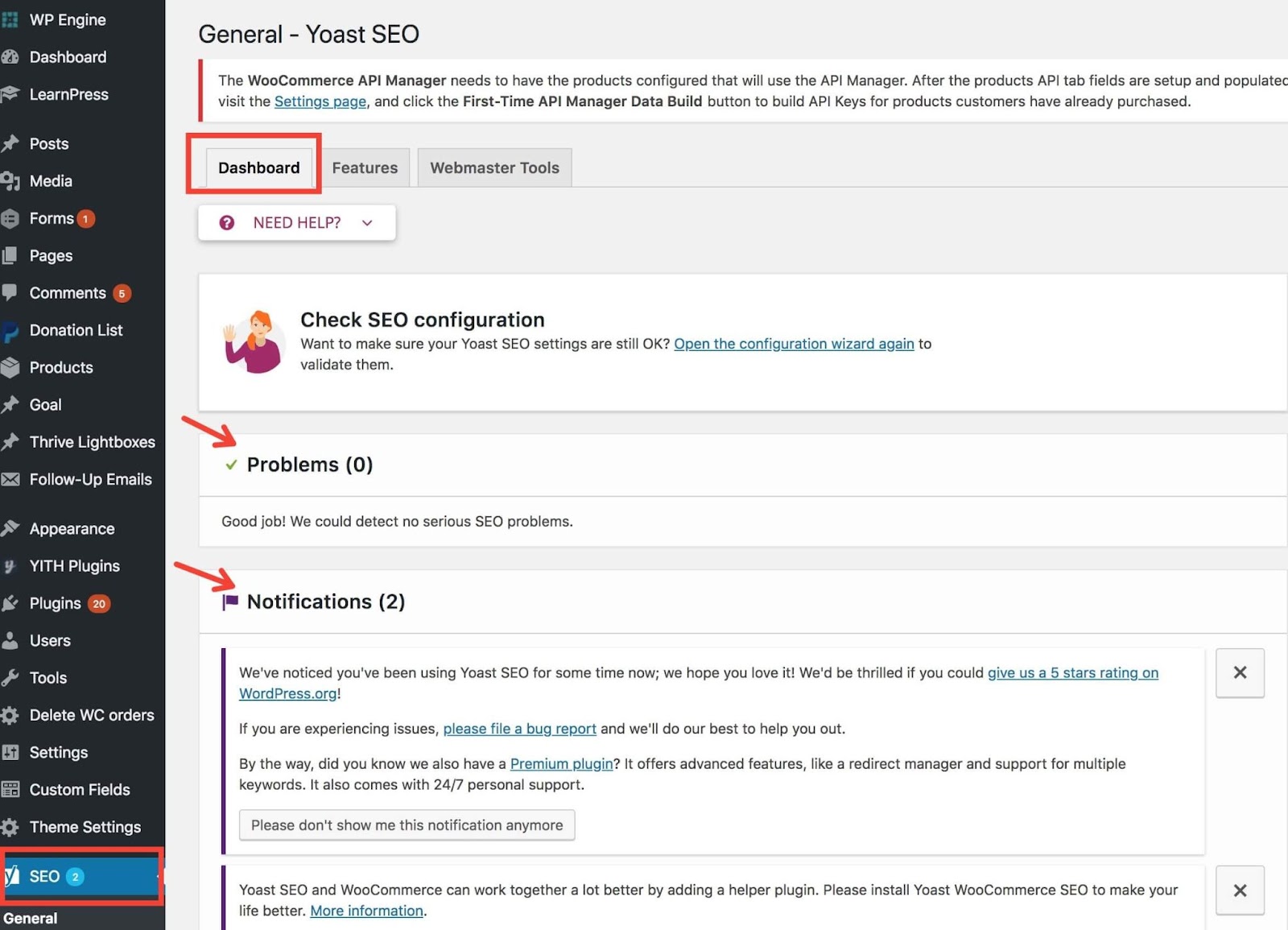
Enable XML Sitemaps: Navigate to Yoast SEO > General > Features. Ensure the "XML sitemaps" toggle is switched on. Yoast will automatically create and update the sitemap as you add content. You can find the sitemap URL here to submit to Google Search Console.
Set Canonical URLs: When editing a post or page, scroll down to the Yoast SEO meta box. Click on the "Advanced" tab. Here you will find the "Canonical URL" field. Leave it blank if the page is original. If it is syndicated or similar to another page, paste the URL of the preferred version here.
These steps help search engines understand your site structure and which pages to prioritize, forming the foundation of good SEO. Dive deeper into other advanced features offered by Yoast SEO in our full comparison.
To track ranking performance, a marketing team can use SEMrush's Position Tracking tool to monitor their website's daily visibility for specific keywords across different locations and devices. This setup provides actionable data on SEO campaign effectiveness and highlights where competitors are gaining an edge for crucial search terms.
Setting up a new project is a methodical process that lays the groundwork for ongoing analysis. The initial steps are:
Create a Project: Start by entering your domain into the SEMrush dashboard to create a new project.
Set Up Position Tracking: Select the Position Tracking tool from the project dashboard. Configure the campaign by setting the search engine (e.g., Google), device (desktop or mobile), and specific geographic location to track.
Add Your Keywords: Input the list of target keywords related to your product launch. You can add them manually, from a file, or import them from other SEMrush tools.
Add Competitors: Add the domains of your main competitors to benchmark your performance against theirs from day one.
Once configured, the tool will begin gathering data, providing a clear view of your search visibility. Uncover how to interpret this data to refine your strategy in our complete guide.
Consistently using Yoast SEO's schema markup feature is a form of future-proofing your website's SEO. By providing structured data, you are explicitly telling search engines what your content is about, which improves indexing accuracy and makes your site eligible for rich snippets and other emerging search features.
This strategic implementation of schema has profound long-term implications for your digital presence. It positions your content as a reliable and well-structured source of information, which is increasingly favored by algorithms powering voice search and AI-driven answer engines. Over time, this can lead to:
Increased eligibility for rich results like FAQs, reviews, and how-to carousels.
Higher click-through rates as your search listings become more visually appealing.
Improved chances of being featured in "People Also Ask" boxes and other SERP features.
Better comprehension of your content by search engines, leading to more relevant rankings.
By adopting schema early with a tool like Yoast SEO, you build a competitive advantage that will likely grow as search becomes more contextual and semantic. Learn how this tactic fits into a broader SEO strategy in our full article.
Neglecting URL changes without proper redirects leads to broken links and 404 errors, creating a poor user experience and diluting valuable link equity that your old pages had accumulated. Yoast SEO Premium's Redirect Manager solves this by allowing you to easily implement 301 redirects, ensuring users and search engine crawlers are sent to the new page.
This common oversight can seriously damage a website's search performance. The problems that arise include:
Loss of "Link Juice": Backlinks pointing to the old URL no longer pass authority to your site, diminishing your domain's power.
Poor User Experience: Visitors landing on a "Page Not Found" error are likely to leave your site immediately, increasing bounce rates.
Wasted Crawl Budget: Search engines spend resources crawling dead-end pages instead of your important new content.
The Redirect Manager in Yoast SEO Premium automates much of this process, even prompting you to create a redirect when you change a URL. This preserves your SEO value and maintains a smooth user journey. Discover other common mistakes and their solutions in our detailed analysis.
SEMrush directly addresses the strategic blind spot of internal focus by providing a comprehensive view of your competitors' digital marketing playbooks. It turns competitor activity into actionable intelligence, showing you which keywords they are ranking for, where their backlinks come from, and what their ad strategies look like.
This external perspective is critical for building a strategy that can win in a crowded market. Instead of guessing what works, you can use SEMrush to:
Identify content topics that are successfully driving traffic for your rivals.
Discover keyword gaps where competitors are visible, but you are not.
Analyze the quality and source of their backlinks to inform your own link-building campaigns.
Benchmark your site's traffic and engagement against others in your industry.
By moving from an inward-looking to a market-aware approach, you can make more strategic decisions about where to invest your marketing efforts. Explore how to build a full competitive analysis report using these tools in our in-depth guide.
The primary difference lies in scope: Yoast SEO is a tactical tool for perfecting individual pieces of content on your website, while SEMrush is a strategic suite for understanding the entire market landscape. For a small business, prioritizing Yoast SEO first is typically the most effective approach as it builds a solid foundation of high-quality, optimized content.
Think of it as building a house versus planning the city. Yoast SEO helps you build a strong house, one well-written page at a time. It focuses on:
Readability and keyword optimization.
Technical on-page elements like meta descriptions and schema.
Internal linking and site structure.
Once your house is in order, SEMrush helps you understand the neighborhood. It provides data on competitors, keyword opportunities, and backlink sources, which informs your long-term growth strategy. Starting with a solid on-page foundation ensures that when you do attract more traffic, visitors find valuable content. Learn when to graduate from one tool to the other in our complete guide.
Amol has helped catalyse business growth with his strategic & data-driven methodologies. With a decade of experience in the field of marketing, he has donned multiple hats, from channel optimization, data analytics and creative brand positioning to growth engineering and sales.

 Growth Strategy and Planning
 Inbound Growth
 Growth Hacking
 Fractional CMO
 Search Engine Optimization
 Paid and Performance Marketing
 Social Media Marketing
 Demand Generation
 AI-Driven Growth Strategy
 AI-Native Workflow Automation
 Generative Engine Optimization
 Grove — AI Growth Strategist

 AI Automation
 Framework
 Case Study
 Tools
Tools Growth Tools
 Decision Tree
 Compare
 Custom GPT's
 AI Answer Gap
 Offer
Offer Webstories
 Quizzes
 Blog
Blog AI-powered Apps
 Social Media Tools
 Agency Fit Score